This is a practical guide to TennisAI, listed on the App Store as "Tennis AI : USTA - UTR Coach". Pace makes TennisAI and publishes this blog, so read it as a manual and not as an independent review.
What you need before you start
- An iPhone. TennisAI is an iPhone app.
- A way to hold the phone still, such as a small tripod or a fence clip. You do not need sensors, wearables or expensive equipment.
- The app. It is free to download from the App Store, and the TennisAI app page has the link. TennisAI Pro unlocks full access to video analysis, AI coaching and progress tracking, on weekly, monthly or yearly plans billed through your Apple ID.
Step 1: Film a first clip the app can read
Results vary with video quality, camera angle and lighting, so a few minutes of setup pays off. Start with a practice clip, because it gives you many repetitions of each stroke.
- Put the phone in a spot you can use again. A corner view from behind the baseline is a good all-round choice, and a side-on view shows contact more clearly.
- Check that your feet and your racket at full extension stay in the frame, and film in good light.
- Include the strokes you want scored. If you only hit forehands, the backhand and serve will show as "Not in video".
- Keep your original clip on your phone, because uploaded videos are deleted after analysis.
Our guide to filming your tennis covers camera positions and phone settings.
Step 2: Upload the clip and start the analysis
Open the Analysis tab and add your video on the Swing Analysis screen. Use Change or Remove if you picked the wrong clip, then tap Analyze Video. The analysis happens after you upload, so TennisAI gives you no feedback while you are playing.
Step 3: Read your results
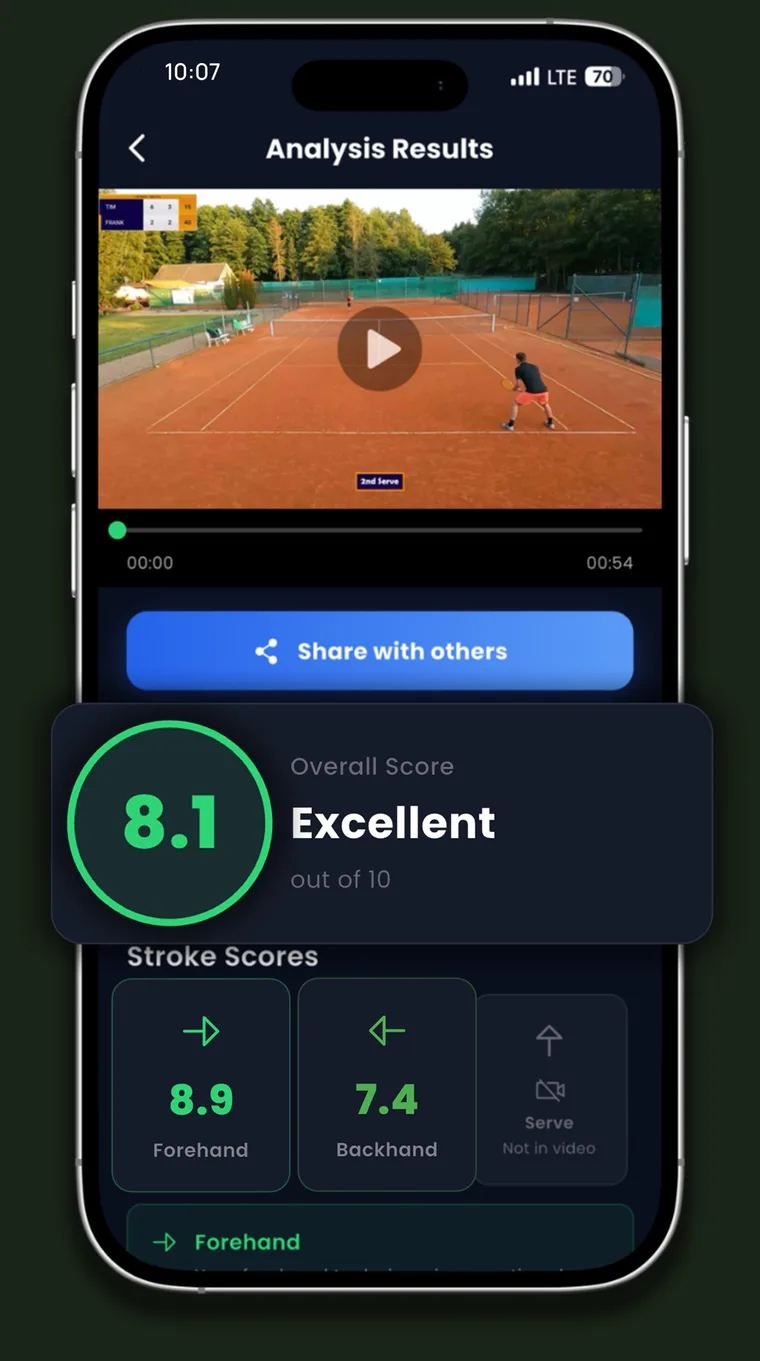
| What you see | What it means | What to do with it |
|---|---|---|
| Overall score out of 10 | A summary of the strokes found in this clip. It is an automated estimate. | A starting point. |
| Forehand, backhand and serve scores | A separate score for each stroke in the clip. | Compare them to choose one focus. |
| "Not in video" | That stroke was not in the clip, so it has no score. | It is not a low score. Film the stroke next time if you want it analyzed. |
| Feedback | Comments that can cover swing path, timing, contact point, body position, footwork, balance, control, consistency, power and overall stroke technique. | Choose one comment and test it in your next session. |
| Share with others | Sends your results to someone else. | Send them to your coach or practice partner. |
Check each comment against the video. If the feedback says your contact is late, pause your clip near contact and see whether the ball is in front of your body. AI output can be wrong, so if you cannot see the problem, treat the comment as a question for your next clip. What AI can and cannot judge from a video explains where automated analysis is weakest.
Step 4: Ask the AI Coach better questions
The AI Coach tab answers questions about strokes, drills, match preparation and your training routine. Its quick questions are good places to start. You will usually get a more useful answer if you add your finding, your time, your equipment and a number to count.
| Instead of | Try asking |
|---|---|
| How can I improve my serve? | My serve score is lower than my forehand score, and the feedback mentions timing. I practice alone with a basket of balls for 30 minutes. Give me one drill with a target I can count. |
| What drills help with consistency? | I lose most rallies on my backhand, usually into the net. I play with a partner at my level. Give me two cross-court drills with a rally-length goal. |
| Create a training plan | Create a 4-week plan for my serve and backhand. I can practice twice a week for 60 minutes, and I have a league match on Sundays. |
| How do I prepare for my match? | I play a steady baseliner on Saturday, and I rush points when I am behind. What should I practice on Thursday, and what can I do between points? |
Chat is session-based and is not stored permanently, so copy any drill or plan you want to keep into your notes. The answers are automated and can be wrong. If a suggestion makes no sense, check it with a coach. If something hurts, stop and see a professional.
Step 5: Use Progress to compare sessions
The Progress tab shows your session history, your average score and your technique scores. You can filter sessions by stroke, and each session shows a percentage change.
- Filter first. Look at one stroke at a time, because a mixed list makes a change hard to read.
- Keep the setup the same. Use the same camera spot and the same kind of session, or you may be measuring your camera position and not your tennis.
- Ignore single jumps. One session can move because of the light or the angle. Look for a direction across several sessions.
What the estimated NTRP, UTR, WTN and ITN numbers mean
Progress also shows estimated USTA NTRP, UTR, WTN and ITN numbers. The app labels them "Estimated from your video analyses" and "not official". TennisAI is not affiliated with UTR Sports, USTA, the ITF (now World Tennis) or any official association, and it does not issue ratings.
| Number | What the official version is based on |
|---|---|
| USTA NTRP | New players complete a self-rate questionnaire. Computer ratings come from USTA League play and are generated once a year, in December. |
| UTR | A weighted average of up to 30 of your most recent match ratings from the last 12 months, run by UTR Sports. |
| WTN | Match results compared with what the algorithm predicted, on a scale from 40 (lowest) to 1 (highest). |
| ITN | An older ITF scale, described by a commercial rating converter as superseded by WTN. |
Official ratings come mainly from results against real opponents, while the estimates in TennisAI come from how your strokes look on video. Use the estimated NTRP and UTR numbers as a rough personal reference. Do not use them to self-rate, choose a league or support an appeal, and do not expect them to match your official ratings. The USTA says numbers from third parties are not accurate NTRP ratings. Our UTR vs NTRP guide explains the official systems.
A simple weekly routine with TennisAI
This is a suggested routine for someone who plays about twice a week. If you play more or less, keep the order and change the spacing. For a full schedule, see our 4-week tennis training plan.
| When | What to do |
|---|---|
| First session of the week | Film a few minutes of your focus stroke from your usual spot, then upload it. Choose one comment to test. |
| That evening | Ask the AI Coach for one drill with a number to count, and save it in your notes. |
| Second session | Do the drill with the phone in your bag, and write down your count. |
| End of the week | Filter Progress by that stroke and decide whether to keep going or change focus. |
| Every four weeks | Film some match points as a check under pressure. If you have a coach, share your results. |
Is it working? A check after four weeks
- Did your on-court count improve, such as rally length or serves on target?
- Is the score for that stroke higher across several sessions from the same spot?
- When you compare an old clip with a new one, can you see the change yourself?
With two or three yes answers, keep going or pick the next focus. With one or none, change the drill or take your clips to a coach. If your count and your score disagree, trust the count, because it comes from real balls on a real court.
What TennisAI does not do, and who it suits
- Scores cover forehand, backhand and serve. The listing does not advertise separate scores for volleys, returns or slices.
- TennisAI's listing does not advertise match score tracking, shot placement charts or shot-speed measurement. For those jobs, and for calls on close balls, SwingVision is the stronger choice as of November 2026.
- The output is an automated estimate and can be wrong. Analysis is for education and training, and it does not replace professional coaching or assess pain or injury.
TennisAI suits iPhone users who are willing to film themselves and want stroke feedback between lessons. It suits you less if your main interest is match statistics, or if you do not use an iPhone.
Frequently asked questions
Is TennisAI free?
It is free to download. TennisAI Pro unlocks full access to video analysis, AI coaching and progress tracking, with weekly, monthly or yearly plans billed through your Apple ID.
Why does my result say "Not in video"?
That stroke was not in your clip, so it is not scored. Include the stroke in your next clip if you want feedback on it.
Are the NTRP and UTR numbers in TennisAI official?
No. They are estimates from your video analyses, and the app labels them as not official. Official NTRP ratings come from the USTA, and official UTR ratings come from UTR Sports.
What phones does TennisAI work on?
TennisAI is an iPhone app, available on the App Store.
Does TennisAI keep my videos?
Per the Privacy Policy, videos are processed temporarily, deleted automatically after analysis and not stored on Pace's servers. Keep your own copy on your phone if you want to rewatch a clip.
See this in your own game
Upload a practice or match video to TennisAI and get feedback on your forehand, backhand and serve.

Sources
- USTA: NTRP ratings FAQs
- UTR Sports Help Center: how the UTR rating is calculated
- ITF: World Tennis Number FAQ (January 2025)
- World Tennis Number: WTN algorithm enhancements now live
- Bounce: tennis rating converter (ITN status)
- AP via WTOP: the International Tennis Federation is now World Tennis
- App Store: SwingVision: Tennis Pickleball
- TennisAI: Privacy Policy
This article is general information about tennis training and does not replace a coach or medical advice. Stop and see a professional if something hurts. TennisAI is made by Pace, the publisher of this blog.
