Count Calories From a Photo: How It Works and How to Get It Right
By the DietX team · Updated · 6 min read
To count calories from a photo, you take a picture of your meal and an AI calorie counter identifies the foods, estimates how much of each is there and looks up the nutrition. Treat the result as a first draft and review it before saving, because a camera can't see what's mixed in: one tablespoon of olive oil in the pan adds about 120 kcal (USDA data).
Below you'll find how it works, the steps in DietX, how to take a better picture and how to add what the camera misses.
How a calorie counter by photo works
Apps differ in the details, but the job comes down to three steps.
- Identify the food. The model looks at the picture and names what it sees: roast chicken, white rice, broccoli.
- Estimate the portion. It judges how much of each food is on the plate. This is the hard step, because a flat image has no built-in sense of size or depth.
- Look up the nutrition. It turns each food and amount into calories, protein, carbs and fat.
Research suggests the first step is the strongest. A study of ChatGPT on meal photos found it did well at identifying foods and estimating small portions, but poorly on medium and large portions and on exact nutrient values, and it tended to underestimate. That study tested ChatGPT rather than a calorie app, so it can't speak for every product. A 2025 validation against weighed food records found that accuracy depends on clear images where the food is visible and on getting the portion size right.
So the tips below come down to showing the food clearly and showing its size. For the full evidence, read how accurate AI calorie counters are.
How to count calories from a photo in DietX
Here is the process in DietX, the app we make.
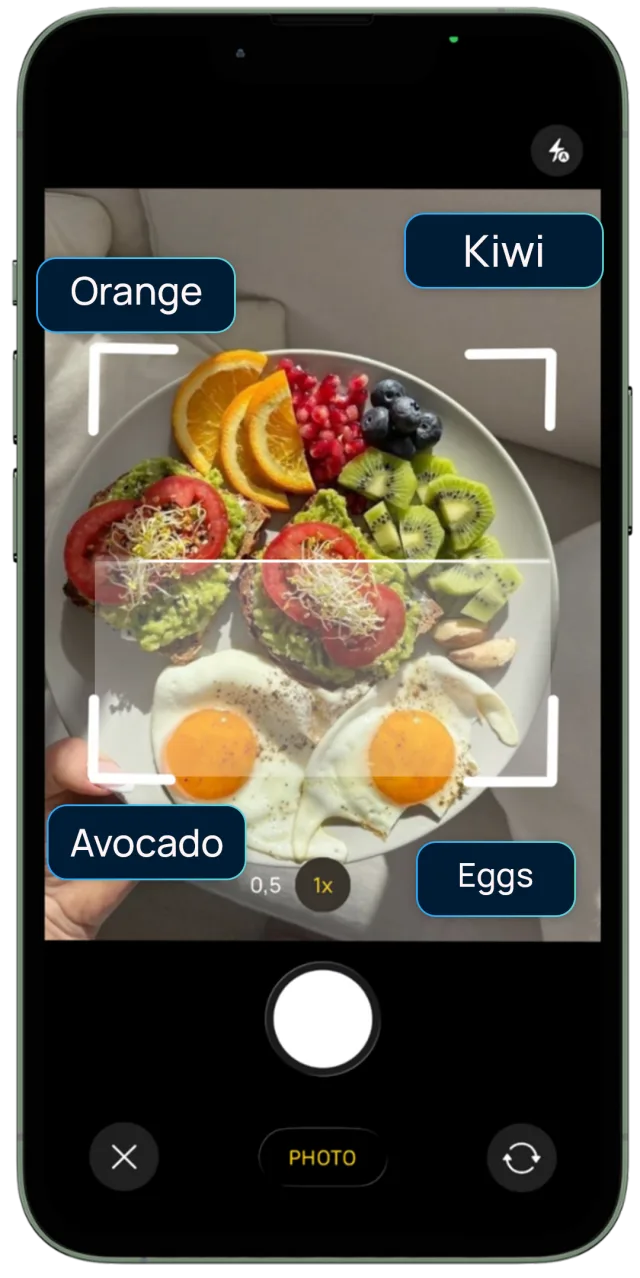
- Take a photo of your meal.
- Review the result. AI estimates the calories, protein, carbs and fat.
- Edit any item that looks wrong, such as a food it misnamed or a portion that looks too small.
- Save it to your log.
Don't skip step 3. A validation study of one image-recognition app found its results improved when users corrected them by hand. DietX's own App Store listing says estimates may vary, so treat the first number as something to check.
Tips for a better food photo
We can't put a figure on how much each tip helps, but each one gives the app less to guess.
- Shoot from above. An overhead shot shows every item and how much of the plate it covers.
- Add a side angle for tall food. A burger, a stack of pancakes or a deep bowl hides its height from above. If you only get one shot, pick the angle that shows the most food.
- Use good light. Move near a window or out of your own shadow. In a dim room, a description may work better than a dark photo.
- Separate the foods. Spread things out before you shoot. Rice under a curry is rice the camera can't measure.
- Include something for scale. A fork or your hand gives a rough reference for size.
- Take food out of the box. Foil trays and wrappers hide most of what you're logging, so put takeout on a plate first.
What a photo can't see, and how to add it
A photo shows the surface of a meal. Fat that soaked in, sauce stirred through the rice and cheese under the toppings are all easy to miss. These amounts look small and add up fast, going by USDA values:
| Hidden food | Amount | About |
|---|---|---|
| Olive oil in the pan | 1 tbsp (13.5 g) | 120 kcal |
| Butter on toast or vegetables | 10 g | 72 kcal |
| Peanut butter under the jam | 20 g | 120 kcal |
| Sharp cheddar under the toppings | 20 g | 82 kcal |
Here is what that does to a meal. A plate of 150 g roasted chicken breast, 200 g cooked white rice and 100 g boiled broccoli comes to 248 + 260 + 35 = 543 kcal. Cook the chicken in a tablespoon of olive oil and the total is about 663 kcal, roughly 22% more on a plate that looks the same. That's our own arithmetic on USDA figures, with no app involved.
Drinks have the same problem. A glass of whole milk and a glass of 1% look alike, yet 250 g comes to about 153 kcal versus 105 kcal (USDA).
To add what the camera missed:
- Before you save, ask what went into the pan or onto the food that you can't see.
- Edit the matching item, or log the extra as its own entry by typing or saying it, for example "1 tablespoon of olive oil".
- Measure when you can. At home, use a spoon for oil. For sauces, read the jar's label and log the amount you used.
- When you can't measure, add a rough figure. One tablespoon of oil is a better guess than nothing. Restaurant meals are the classic case, covered in how to count calories when eating out.
When a photo isn't the best way to log
A photo trades some precision for ease. A 2020 review of image-assisted methods found that less burdensome methods are less accurate and that no method suits every setting. So switch when the situation calls for it:
- Packaged food: scan the barcode or read the label. Our guide to nutrition labels and barcode scanners shows how to check the result.
- Already eaten, a dark room or a homemade stew: describe it instead. See how to log food by voice.
- Calorie-dense food you eat often: weigh it a few times. Misjudging almonds by 50 g costs about 299 kcal, while the same mistake on boiled broccoli costs about 18 kcal (USDA).
Effort matters as well. In a study of 142 adults, participants spent 23.2 minutes a day logging in the first month, which helps explain the appeal of a quicker method, even a less exact one.
Trying photo logging yourself
DietX logs food by photo, typed description, voice or barcode, and you can edit any item before saving. It is free to download with a free trial, and Premium is a subscription. Other apps offer photo logging too, and some keep it on a paid plan, which we lay out in our comparison of AI calorie counter apps.
Frequently asked questions
Can you count calories from a picture?
Yes. Apps with photo logging identify the food, estimate the portion and look up the nutrition. Treat the result as an estimate and correct it, especially the portions and anything the camera can’t see, such as cooking oil.
How accurate is a photo calorie counter?
Nobody can give you one reliable figure. The sources we use include no independent head-to-head test of consumer calorie apps, and percentages on app websites are the vendors’ own. Research suggests identifying food is the stronger part, with portions and hidden ingredients weaker.
What is the best angle for a food photo?
Shoot from directly above so every item is visible. For tall or deep food such as a burger or a full bowl, a side angle shows height that a top view hides. Good light and a fork or hand for scale also give the app less to guess.
Does a photo calorie counter pick up oil and butter?
Don’t count on it. A camera can’t measure fat that has soaked in or melted, so add it yourself. One tablespoon of olive oil is about 120 kcal and 10 g of butter is about 72 kcal.
Is there a free app that counts calories from a photo?
As of November 2026, SnapCalorie offers photo logging and says its core features are completely free. DietX is free to download with a free trial, and Premium is a subscription. Features change, so check the app’s own page before you commit.
Sources
- USDA FoodData Central (SR Legacy)
- An evaluation of ChatGPT for nutrient content estimation from meal photographs (2025), Nutrients
- Customized multimodal GPT-4o and image-based dietary assessment against weighed food records (2025), Am J Clin Nutr
- Nutrient and food group prediction by image recognition in a smartphone app (2022), JMIR Form Res
- DietX on the App Store
- Review of the validity and feasibility of image-assisted methods for dietary assessment (2020), Int J Obes
- Harvey et al. (2019), Obesity: Log Often, Lose More
General information, not medical advice. Talk to a doctor or dietitian before changing your diet, especially if you are pregnant, under 18 or have a health condition. If tracking food makes you anxious or you have a history of disordered eating, please skip calorie counting and ask a professional for support.