Photold
The Best Apps to Scan Old Photos With Your Phone
By the Photold team · · 7 min read
Photold is our own app, so we are not neutral here. What we say about other apps comes from their own public pages, checked on the date shown.
For a handful of prints, a free app such as PhotoScan by Google Photos or your phone's own camera is enough. For whole albums, pick an app whose listing says it scans several photos in one shot, such as Photomyne or Pic Scanner Gold. For hundreds of loose prints, a sheet-fed photo scanner is faster than any app. Document scanners such as Adobe Scan are built for paper and PDFs, not for photos.
Everything below comes from each app's official store listing or support page, read on 26 November 2026. We have not tested these apps, and features and plans change, so check the listing before you pay. Photold, which also has a scan flow, is our own app.
Which scanner app fits your pile
| Your situation | Good fit | Why |
|---|---|---|
| A few photos, today, for free | Your phone's camera or PhotoScan by Google Photos | Nothing to pay. PhotoScan's listing describes glare-free scans and automatic cropping |
| Whole albums with photos stuck on the pages | Photomyne or Pic Scanner Gold | Both listings say they scan several photos in one shot and crop each one |
| You dislike subscriptions | Pic Scanner Gold (iPhone) | Its listing says one purchase, with no subscriptions or in-app purchases |
| Hundreds of loose prints | A sheet-fed photo scanner such as Epson FastFoto | It feeds a stack of prints instead of one photo per shot |
| You want to repair photos after scanning | Any of the above, then a repair app | Scan at good quality first, fix scratches and fading afterwards |
Photo scanner apps side by side
| App | Platforms | Pricing model | Several photos per shot | Last listed update |
|---|---|---|---|---|
| PhotoScan by Google Photos | iPhone, Android | Free | Not mentioned | November 2022 (iPhone), July 2023 (Android) |
| Photo Scan App by Photomyne | iPhone, iPad, Mac, Android | Free download, paid membership for full use | Yes | November 2026 |
| Pic Scanner Gold | iPhone | One-time purchase | Yes | August 2026 |
| Photo Scanner: Scan old Albums | iPhone | Free download, in-app purchases | Not mentioned | May 2026 |
| Photold (Scan Photo, Negative Scan) | iPhone, Android | Free download, AI tools in Photold Pro | Not mentioned | Not applicable |
"Not mentioned" means the listing does not describe the feature. It does not prove the app cannot do it.
What each app does well, and its catch
- [PhotoScan by Google Photos](https://apps.apple.com/app/id1165525994). Free, with a step-by-step capture flow that its listing says gives glare-free scans, plus automatic cropping, perspective correction and rotation. The catch: its listings show no update since 2022 on iPhone and 2023 on Android, and they do not mention scanning several photos at once.
- [Photomyne](https://apps.apple.com/us/app/-/id1037784828). Built for albums: its listing says it scans several printed photos in one shot, detects the edges, crops, rotates and corrects color, and lets you add names, dates, places and stories, and scan the backs of photos. Its Android listing also mentions negatives and slides. The catch: its Google Play listing describes the free app as basic scanning, full use needs the membership, and glare removal is an optional AI tool that uses AI credits.
- [Pic Scanner Gold](https://apps.apple.com/app/id1124131441). iPhone only, sold as one purchase. Its listing says it scans several photos or a whole album page at once, crops and enhances them, saves each photo at 300 DPI and lets you edit photo dates in batches. The catch: no Android version, and it is not made for negatives or slides.
- [Photo Scanner: Scan old Albums](https://apps.apple.com/app/id1178554831). Its listing describes automatic photo detection and cropping, restoring faded colors and editing dates and places. The catch: it does not describe scanning several photos at once or removing glare.
- Scan Photo in Photold. A camera flow for prints in the Photold mobile app, with a separate Negative Scan for film negatives. Neither is available on the web. It makes the most sense if you plan to repair the photos in the same app.
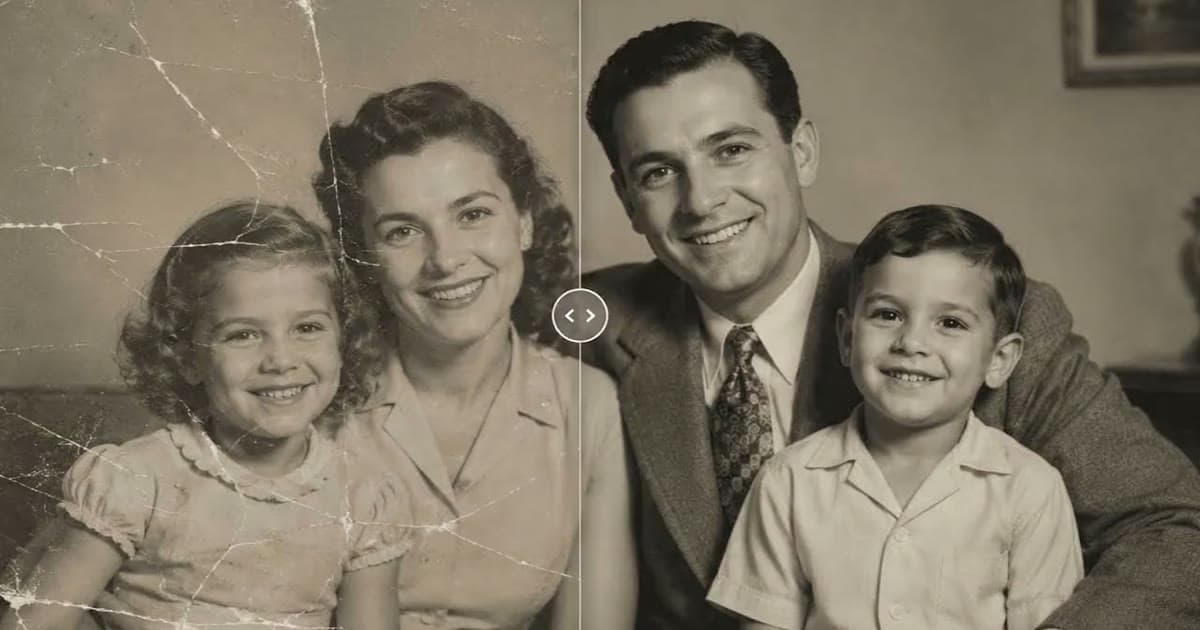
Scanned your photos and found scratches, fading or tears? Repair them in Photold.Try Photold
Why document scanner apps are the wrong tool
Many phones already have a scanner, but it is usually a document scanner. Apple's support page describes the Notes scanner for documents and signatures. Google's page describes the Drive scanner for receipts, letters and statements saved as PDF or JPG. Adobe Scan is built around PDFs and text recognition, though its listing says it can also save printed images as JPEGs.
None of these pages describes them as photo scanners: they are made for paper, and a portrait needs its skin tones and soft shadows kept, not a crisp page of text. Use them for the letters, certificates and documents in your family archive, and if you try one on a photo, compare a face with the original print before you scan more.
Microsoft Lens is no longer an option. Microsoft's support page says it was removed from both app stores on 9 February 2026 and stopped making new scans after 9 March 2026.
When a scanner beats any app
An app captures one shot at a time, even when that shot holds several photos. A sheet-fed photo scanner works differently. Epson's page for the FastFoto FF-680W says its feeder holds 36 photos, that it scans "as fast as 1 photo per second at 300 dpi", and that it captures handwritten notes on the backs in the same pass.
For prints, the Library of Congress calls 300 dpi a good starting point, and higher resolutions mostly show more of the defects. Film negatives and slides are different: they do warrant higher resolutions, so see how to scan film negatives with your phone or use a film scanner for those.
Never feed fragile, torn or curled photos through a sheet feeder. Photograph those flat with your phone instead; our guide to scanning old photos with your phone covers the setup that avoids glare and tilt.
Test two apps before you scan a whole album
- Pick one glossy print and one photo still stuck in an album.
- Scan both with each app you are considering, in the same light.
- Zoom in on the faces. Look for glare spots, blur and over-sharpened edges.
- Check the crop: corners should be square and no edge of the photo cut off.
- Export one file and check where it lands and how large it is.
- Only then decide. Paying for a month to finish an album is often cheaper than a year you will not use.
Once the photos are scanned, plan the rest: names, folders and backups. Our plan for digitizing whole family albums goes through it step by step, and Photold can repair the scans that need it.
Frequently asked questions
What is the best free app to scan old photos?
PhotoScan by Google Photos is free on iPhone and Android and its listing describes glare-free scans with automatic cropping. Its listings show no update since 2022 on iPhone and 2023 on Android.
Which app scans several photos at once?
Photomyne and Pic Scanner Gold both say in their listings that they scan several photos in one shot and crop each one separately. Photomyne needs its membership for full use, and Pic Scanner Gold is a one-time purchase on iPhone.
Is it better to scan photos with a phone or a scanner?
A phone app is fine for a few prints and for photos stuck in albums. For hundreds of loose, sturdy prints, a sheet-fed photo scanner is much faster, and a flatbed is gentler for fragile ones.
Can I scan photos with the Notes app or Google Drive?
Their scanners are made for documents, and Apple and Google describe them that way. For photos, use a photo scanner app or your camera, or compare a test scan of a face with the print first.
Is Microsoft Lens still available?
No. Microsoft says it was removed from the app stores on 9 February 2026 and stopped making new scans after 9 March 2026.
Sources
- App Store: PhotoScan by Google Photos
- App Store: Photo Scan App by Photomyne
- Google Play: Photo Scan App by Photomyne
- App Store: Pic Scanner Gold
- App Store: Photo Scanner: Scan old Albums
- App Store: Adobe Scan
- Apple Support: Scan documents in Notes
- Google Drive Help: Scan documents
- Microsoft Support: Microsoft Lens retirement
- Epson: FastFoto FF-680W
- Library of Congress, The Signal: How Many DPI/PPI Is Too Much?